Azure Cloud Preparation
Follow these initial steps to set up your free Azure account and gather the credentials needed for deployment.
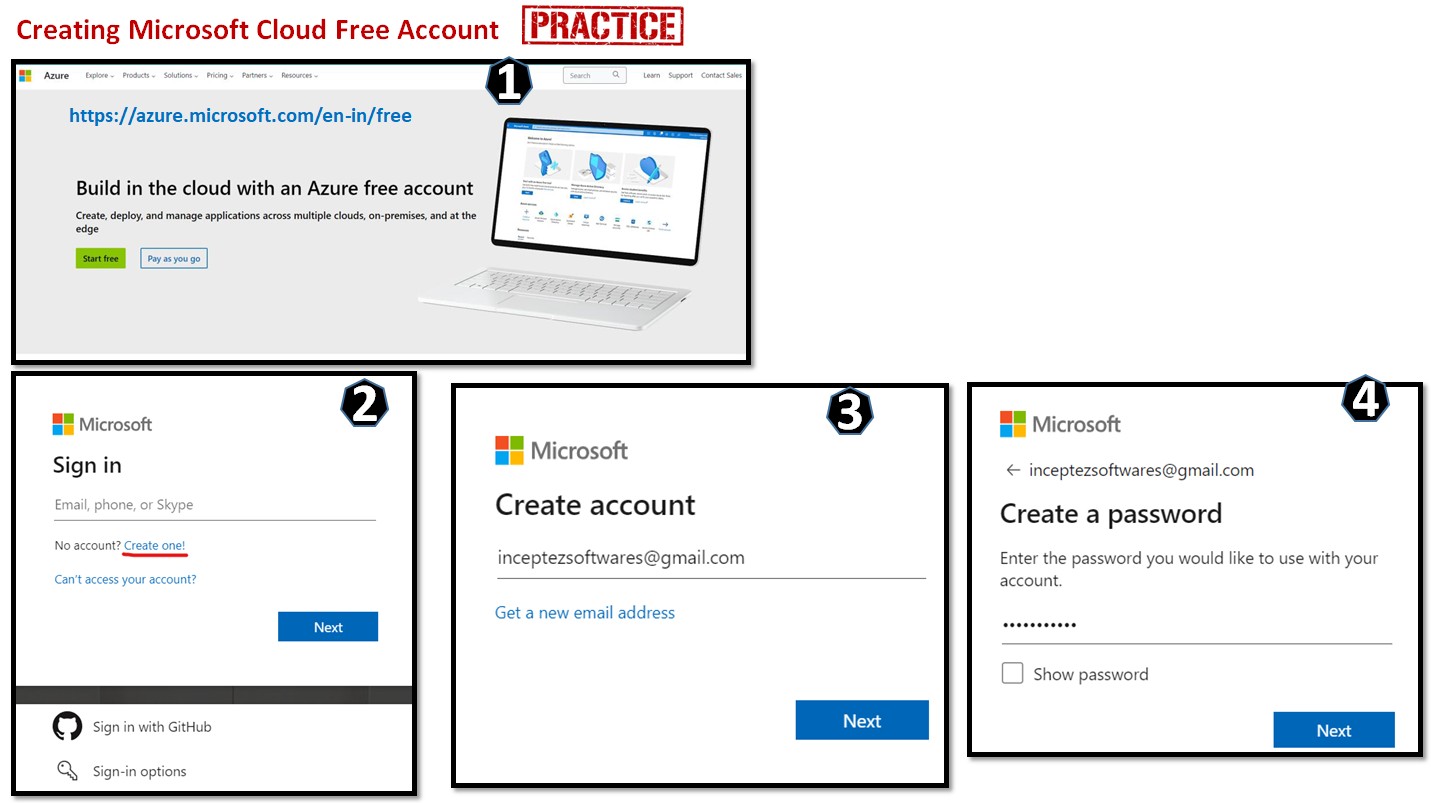
1 Create Azure Cloud Account
Start by signing up for a free Azure account: https://azure.microsoft.com/en-in/free
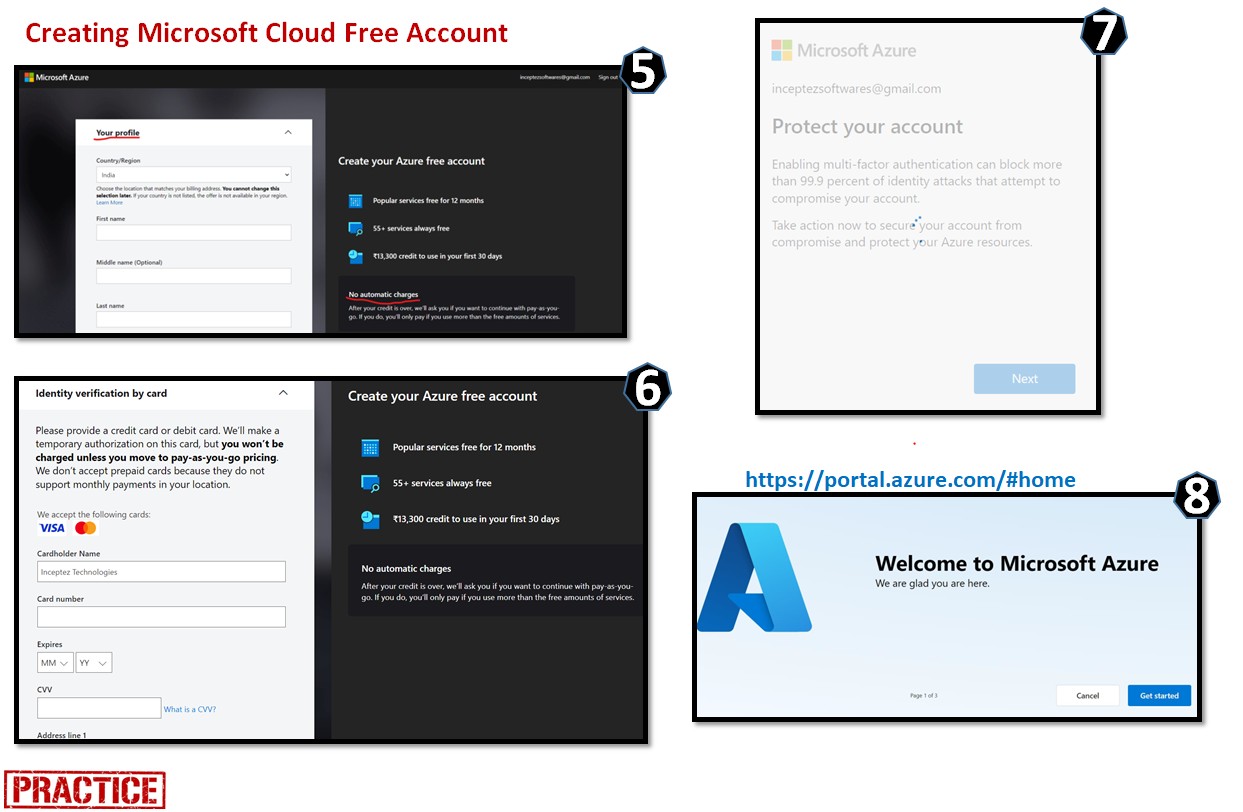
2 Login to the Azure Portal
Once your account is created, log in to the Azure Portal using your new credentials: https://portal.azure.com
3 Identify Common Credentials
Locate the following parameters inside the Azure Portal. You will need to copy these into the Cloud Platform Setup tab to generate your deployment script.
Tenant ID
Search for Microsoft Entra ID in the top search bar. Click into the overview page and capture the Tenant ID.
Subscription ID
Search for Subscriptions. Select your active subscription from the list and capture the Subscription ID.
Resource Group Name
Search for Resource groups. Create a new one or select an existing one, and capture the exact Resource Group Name.
Cloud Infrastructure Setup
Configure parameters and select resources to auto-generate the Azure deployment script. Dependencies are resolved automatically.
Steps to Include
General Input
Storage Input
Databricks Input
Cluster Name
Steps to Execute the below Script in Azure Cloud Shell
- Copy the script using the button in the window below.
- Open the Cloud Shell in the Azure Portal (click on the
[>_]button in the top right after the search bar). - Create a new file:
vi autoscript.sh - Enter insert mode: Press
esc+i - Paste the script into the editor.
- Save and exit: Press
esc+:wqand hit Enter. - Make the script executable:
chmod 777 autoscript.sh - Run the script:
./autoscript.sh - After the script is completed, capture the
sp_credentials.txtApp ID (Service Principal ID) and Secret value by viewing the file:
cat sp_credentials.txt
Data Ingestion Hub
Download Call Detail Records (CDR) files from the local storage node for processing and analysis.
Select CDR File
Choose a file from the list below to download
Description:
File Preview
Sample DataDatabase & CDC Scripts
Generate SQL scripts for initial loads and Change Data Capture (CDC) updates, and view live database records.
SQL Script Generator
Select a run configuration to generate the corresponding SQL script
Tower Dimension Data (dim_tower_source)
Live ConnectionProject Details & Architecture
Comprehensive overview of the real-time telecom data pipeline, terminologies, and technologies used.
Possible Project Names (Don't use as it is in your resume!!!)
Journey and Performance Insights Lakebase
A Unified Medallion Lakehouse for Batch Call Data Analytics & Real-Time Network & Device Monitoring
Revenue & Network Integrity Datahub
Unified Revenue & Network Integrity Streaming Datahub
Unified CDR Lakehouse Analytics
The Real-Time & Batch Telco Data Product Suite.
Project Description
This project builds a Batch & Real-time data system that monitors how well cell towers are performing and how customers are experiencing the network.
By combining tower signals, call records, and device data, the system predicts which customers might leave (churn) and helps the company fix network issues before users even notice them.
It creates a 360-degree journey view by linking every customer interaction to specific device performance and tower health in real-time.
This high-fidelity data enables prescriptive analytics, allowing the company to boost revenue through personalized monitoring, support to the customers and proactive maintenance of telecom infrastructure.
Project Diagrams & DFDs
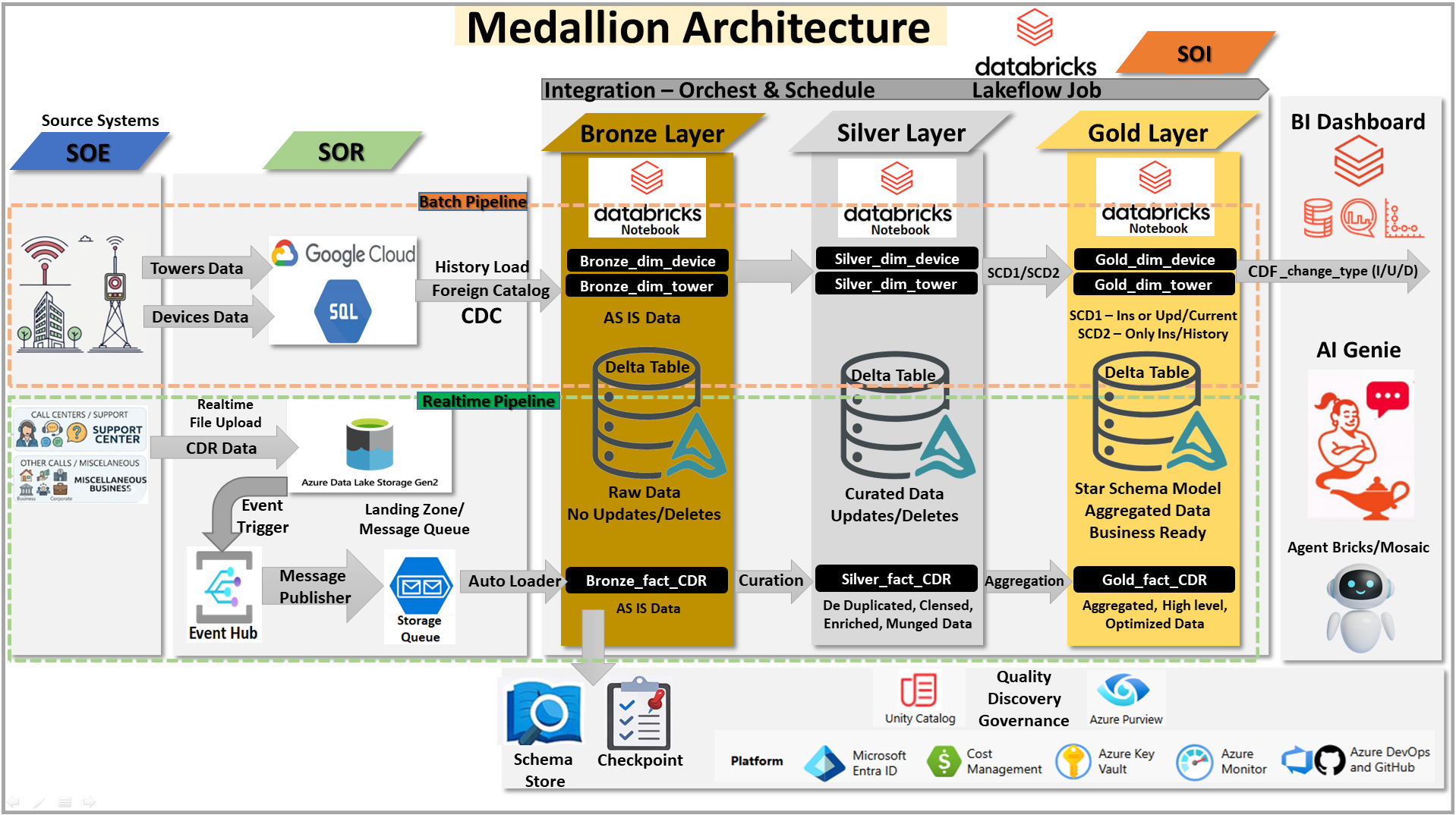
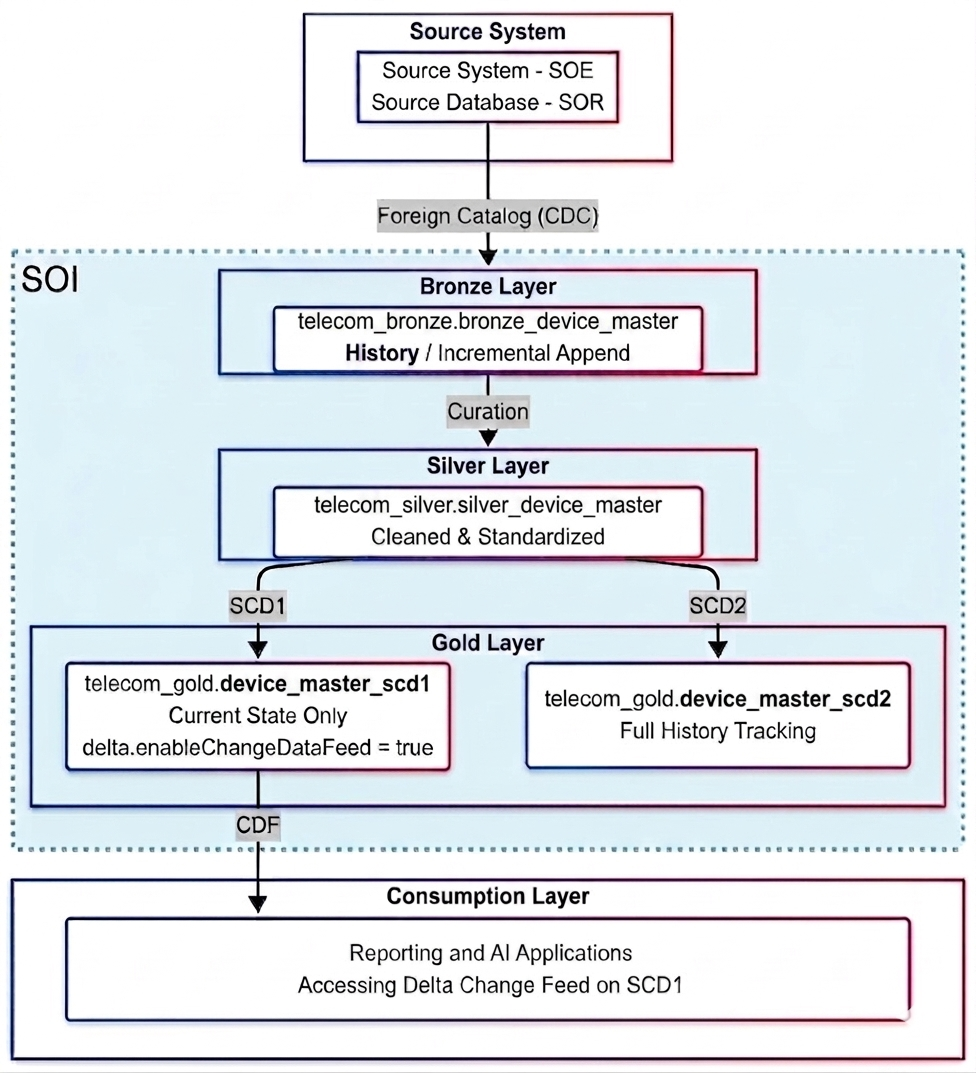
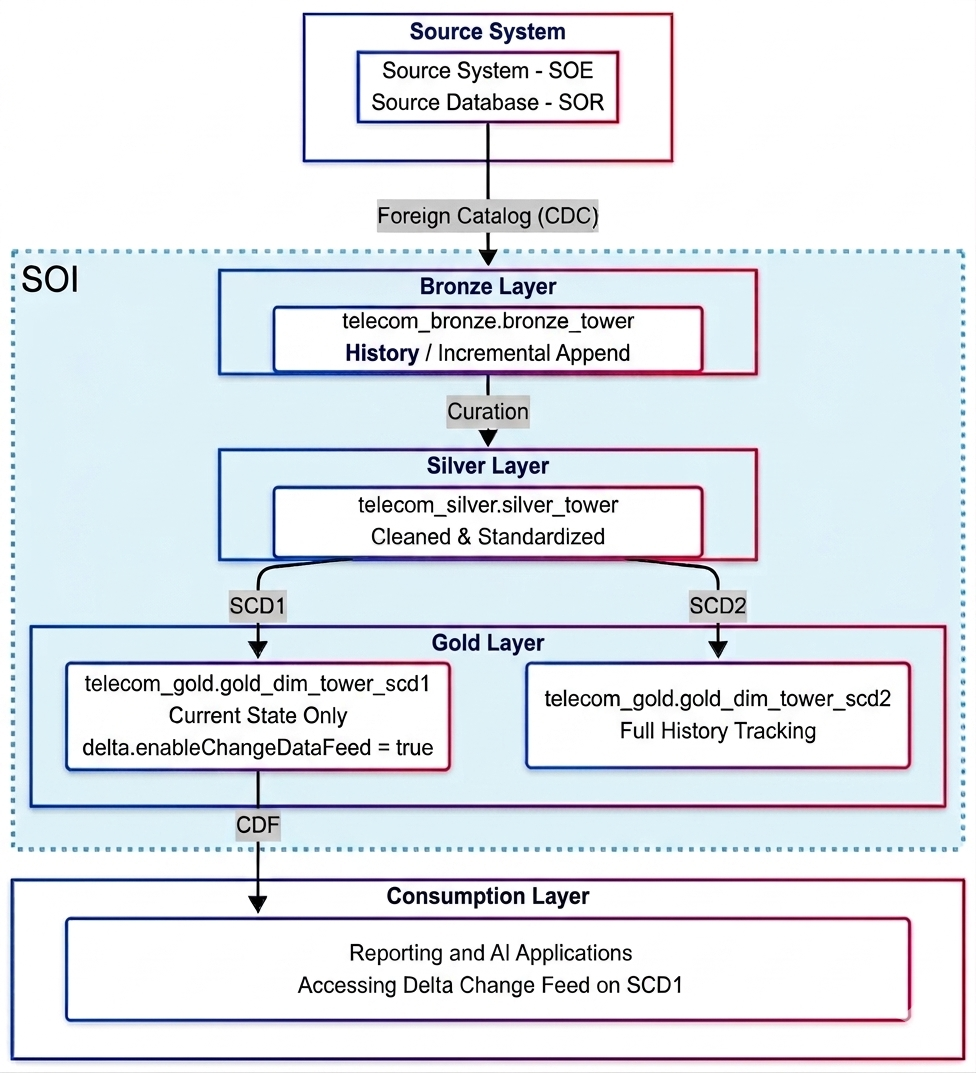
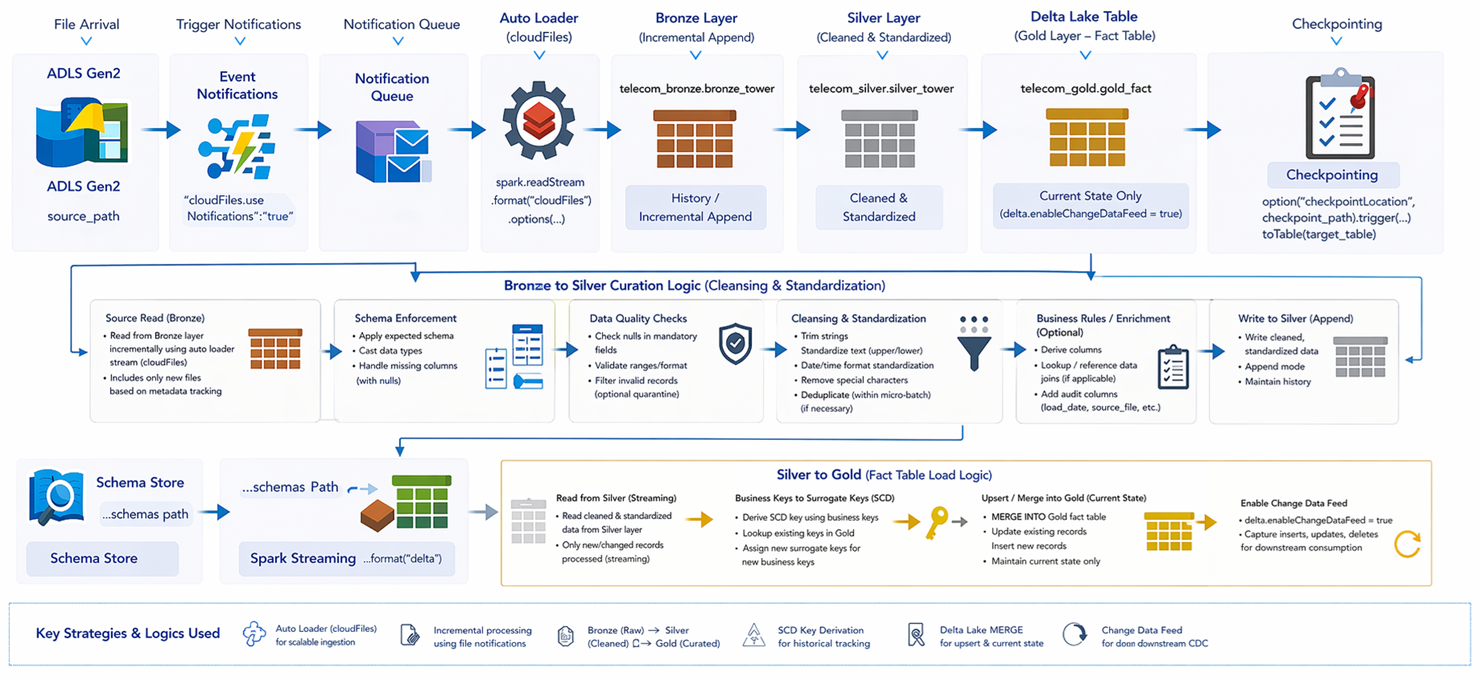
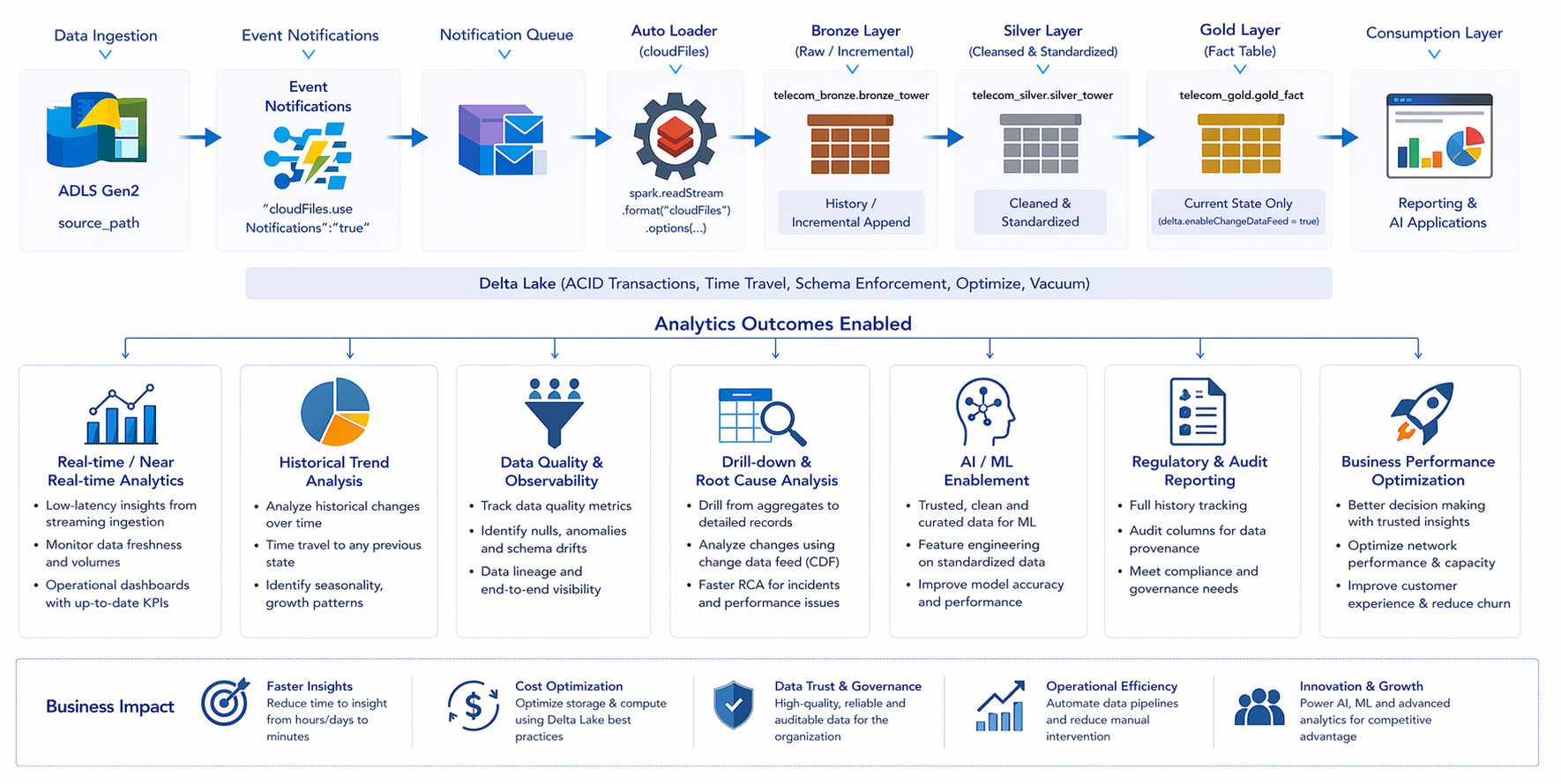
Project Workflow
This project utilizes a Medallion Architecture on Azure Databricks to process real-time telecom CDR streams and IoT device data, reducing churn by identifying customer pain points through a 360-degree engagements view.
The pipeline leverages Auto Loader and Spark Structured Streaming to ingest and enrich File & DB data, performing complex data processing and joins to provide actionable insights into network, device performance and customer behavior. To ensure data accuracy, we have built robust batch pipelines for Device and Tower dimensions, implementing Slowly Changing Dimensions (SCD Type 1 and Type 2).
These pipelines track the lifecycle of hardware such as tower upgrades and device model specifications and are enriched with Change Data Feed (CDF) for optimized analytics. This is further enhanced by the Databricks Lakeflow Declarative Pipeline and automated Lakeflow jobs for seamless orchestration.
By integrating predictive models and real-time notifications, the system enables proactive maintenance of on-premise devices and prescriptive analytics for personalized, low-cost product planning. The finalized data is consolidated into Delta Lake Gold tables, empowering managerial decisions to improve better customer device & call experience, optimize regional tower ROI, and maximize company revenue through high-fidelity, low-latency data access.
1. Data Ingestion (Bronze)
- SOI - Streaming CDR files (CSV)
- SOR - DB source via federated queries
- Auto Loader with File Notification Mode & Late Data Handling
- Schema inference and evolution
2. Processing (Silver)
- Cleans, transforms & Curate raw data
- Applies data wrangling, dedup, standardization & customization
3. Analytics (Gold)
- Business-ready datasets
- Fact and dimension modeling
- Applies CDF logic
- SCD Type 1 & Type 2 for Dimensions
- Analytics team use CDF for row Time travel
Project Outcomes
360-Degree Customer View
From the towers the customers connect to, to the specific device they use
Proactive Maintenance
Instead of waiting for a cell tower to fail, the system sends real-time notifications to repair teams
Revenue Growth
By providing "high-fidelity" (accurate) and "low-latency" (fast) data, the company can move more customers toward self-service apps, reducing support costs and increasing profit.
Prescriptive Analytics
The system doesn't just say "sales are down"; it suggests specific, low-cost data plans tailored to a user
Business Terminologies
- Call Detail Records (CDR)
- Telecom Towers / Network Devices
- Subscriber Activity / Usage Data
- Billing & Revenue Analytics
- Network Optimization & Monitoring
- Customer Usage Patterns
- Data Latency vs Real-time Insights
- Historical Data Tracking
- Regulatory Data Retention
- Master Data (Tower / Device dimension)
Technical Terminologies
Core Technologies
Security Concepts
- Service Principal Authentication (OAuth 2.0)
- Role-Based Access Control (RBAC)
- Secret Management via Databricks Scope
- Data Access Governance (Catalogs & Schemas)
Performance Optimization
- File Notification Mode (avoids directory listing)
- Incremental Processing using CDC/CDF
- Checkpointing & Watermarking
- Dynamic Schema Evolution
- Controlled streaming with maxFilesPerTrigger
Project Execution
Step-by-step execution plan and monitoring for the Telecom Analytics pipeline.
Seamless Execution of the Project Pipeline
Create an Azure Cloud Free Account (If not created yet)
Perform Cloud Platform Setup (Time consuming step)
Execute the setup if you haven't already done so.
Project Walkthrough & Import Code to Workspace
After Project Understanding, Download the code (Databricks notebooks, Lakeflow declarative pipeline, Lakeflow Job) from the Git Repo (https://github.com/mohamedirfankader/databricks-code-repo/tree/main/Telco_Project_base_folder_git) and import it into the new Databricks workspace created.
Initialize Lakehouse Structures
Open the Databricks Notebook 0_First_Time_Run inside the Telco_Project_base_folder and run the code to create foreign catalog & lakehouse schemas and go to next step. Only for the Subsequent runs do truncate/delete tables (if you want to run again this project from scratch).
Connect to Cloud SQL
Open MySQL workbench and connect to Cloud SQL (Credentials will be shared in our group).
MySQL Workbench Installation DocumentLoad Initial Dimension Data
Navigate to DB Data, copy the SQL, and run the Dim Tower & Dim Device First Run (Initial Load) inside MySQL.
Run Lakeflow Job & Fact Analytics
Run the Lakeflow Jobs provided to orchestrate Batch & Realtime steaming Notebooks & Lakeflow declarative pipeline: Telecom_Lakeflow_Job_Dim_Fact_CDC_SCD_CDF_Load
Healthcare Data Ingestion Hub
Download Patient Vitals datasets for streaming and batch processing.
Select Medical Data File
Choose a Vitals stream to download
Description:
File Preview
PHI Masked DataHospital DB & CDC Scripts
Generate SQL scripts for patient and facility data tracking via Change Data Capture (CDC).
SQL Script Generator
Select a run configuration to mimic source database activity
Patient Dimension Data (dim_patient_source)
Live ConnectionHealthcare Project Details & Architecture
Comprehensive overview of the Healthcare & Life Sciences real-time Medallion Architecture.
Possible Project Names
Unified Patient 360 & Care Analytics Lakehouse
Holistic view of patient journey integrating dimensional data and real-time streaming vitals.
Real-Time Vitals Integration Hub
A scalable Azure platform for ingesting IoT vitals telemetry and reducing patient readmissions.
Real-Time EMR Data Integration Hub
A scalable Azure platform for ingesting HL7/FHIR messages and reducing patient readmissions.
Predictive Health Outcomes Datahub
Real-Time & Batch Healthcare Data Product Suite for operational hospital resource optimization.
Project Description
This project implements an enterprise-grade, market-ready Medallion Data Architecture to process high-velocity patient health vitals telemetry across widespread hospital networks.
By heavily integrating Azure Data Factory (ADF) for robust orchestration/scheduling, Azure Databricks for complex clinical data engineering, and Azure Synapse Analytics for high-performance materialized reporting, the system can predict high-risk patients and potential readmissions.
A 360-degree Patient Journey is constructed by linking streaming IoT telemetry (heart rate, SpO2) to dynamic master data via Slowly Changing Dimensions (SCD Type 1 & 2).
The HIPAA-compliant platform guarantees Protected Health Information (PHI) is masked upon ingestion, empowering healthcare administrators with highly optimized PowerBI prescriptive analytics generated seamlessly via Synapse Materialized Views.
Healthcare Pipeline Workflow
The Real-Time Pipeline leverages Azure Databricks Auto Loader (cloudFiles) to actively process high-velocity telemetry files continuously dropped from hospital IoT devices (JSON streams) into ADLS Gen2.
Auto Loader is configured with Azure Event Grid notifications (useNotifications=true) to ingest continuous file arrivals instantly into the Bronze Delta tables with schema evolution, without expensive directory listings. Delta Live Tables perform immediate PHI masking, duplicate removal, and joins against dimensional tracking databases.
Finally, near-real-time updates are synchronized via Databricks direct JDBC load into Azure Synapse Dedicated SQL Pools, refreshing Materialized Views so PowerBI clinical dashboards reflect patient deterioration within seconds.
1. Continuous Ingest (Bronze)
- Continuous JSON File Drops
- Auto Loader File Notification Mode
- Real-time Schema Inference
2. Stream Processing (Silver)
- Stateful Aggregation & Watermarking
- On-the-fly PHI Masking
- Micro-batch Dimension Lookups
3. Serving (Synapse Gold)
- Databricks Direct JDBC Sync
- Active Change Data Feed (CDF)
- Real-time PowerBI DirectQuery
Real-Time Architectural Data Flow
The Enterprise Batch Pipeline utilizes Azure Data Factory (ADF) as the primary orchestration engine. ADF schedules and triggers the extraction of massive on-premise Hospital Information Systems (HIS) via Linked Services mapping to SQL Server or Oracle.
ADF Copy Activities move raw patient and facility master data to ADLS Gen2 Data Lake. Once landed, ADF triggers Databricks Notebook activities to perform heavy Medallion processing: SCD Type 2 dimension building and deduplication.
Finally, ADF utilizes the Azure Synapse connector to bulk load the curated Fact and Dimension tables into Synapse Materialized Views, minimizing computational load on reporting tools during standard business hours.
1. ADF Orchestration
- Scheduled ADF Pipeline Triggers
- ADF Copy Activity from On-Prem HIS
- Lands raw data to ADLS Gen2
2. Databricks compute
- ADF triggers Databricks Notebooks
- Batch SCD Type 2 computations
- Deduplication & Data Cleansing
2. Databricks compute
- ADF triggers Databricks Notebooks
- Batch SCD Type 2 computations
- ICD-10 standardizations & Joins
3. Synapse Data Warehouse
- PolyBase High-throughput Bulk Load
- Synapse Materialized View generation
- Pre-calculated metrics for BI
Enterprise Batch Architectural Data Flow
Implementation Assignments
This comprehensive assignment guides help us building a robust, scheduled healthcare data warehouse from scratch. You will simulate an on-premise EMR database, orchestrate extraction via Azure Data Factory with validation checks, process it using Databricks Medallion architecture (down to attribute-level transformations), and load it directly into Azure Synapse Analytics.
1 Azure SQL Database Setup (Source HIS)
- In the Azure Portal, provision a new Azure SQL Database (Serverless or Basic tier for cost savings) named
hc_emr_db. - Configure network security by enabling "Allow Azure services and resources to access this server" in the Firewalls settings.
- Open the Query Editor and execute the DDL scripts to create
dim_patient_source(attributes:patient_id, patient_name, gender, dob, risk_category, status) anddim_facility_source. - Run the First Run (Initial Load) SQL inserts provided in the Hospital DB Data tab to seed your environment.
2 ADF Orchestration & Extraction
- Provision an Azure Data Factory instance and launch ADF Studio. Create Linked Services for your Azure SQL DB and ADLS Gen2 storage account.
- Build a pipeline named
PL_Ingest_EMR_Data:- Add a GetMetadata activity to dynamically list all tables in the
hc_schema. Pass theChildItemsoutput to a ForEach activity. - Inside the ForEach loop, add a Lookup or Validation activity to run
SELECT COUNT(*) FROM @{item().TableName}. Proceed only if rows > 0. - On success, trigger a Copy Data activity: query the table and sink it as Parquet files to ADLS (path:
landing-zone/@{item().TableName}). - Attach a Web Activity to the failure path (red line) of the Copy Data step to simulate sending an error alert via Logic Apps / MS Teams webhook.
- Add a GetMetadata activity to dynamically list all tables in the
3 Databricks Attribute-Level Medallion Processing
- Bronze Layer: Read the raw Parquet files from ADLS. Append
current_timestamp()asingestion_time. Write the data exactly as-is tohc_catalog.bronze.patient_raw. - Silver Layer (Cleansing & Masking):
- Filter Bad Data:
filter(col("patient_id").isNotNull() & col("patient_name").isNotNull()). - String Cleaning: Strip accidental whitespace using
trim(col("patient_name"))and standardize casing withupper(col("risk_category")). - Domain Standardization: Map gender codes:
when(col("gender") == "M", "Male").when(col("gender") == "F", "Female").otherwise("Unknown"). - Date Validation: Cast using
to_date(col("dob"), "yyyy-MM-dd")and drop rows where DOB > current date. Extract a newcurrent_agecolumn usingdatediff(). - PHI Security: Apply SHA-256 hashing to mask identities:
withColumn("patient_name_masked", sha2(col("patient_name"), 256))and drop the original name. Save tohc_catalog.silver.dim_patient_clean.
- Filter Bad Data:
- Gold Layer (SCD Type 2): Track historical patient risk changes. Use Databricks Delta
MERGE INTOlogic to implement Slowly Changing Dimensions. Add operational attributes:is_current(boolean),effective_date, andend_date.Provide Storage blob data contributor access to the synapse workspace idenitity
Before loading to Synapse, write the curated Gold data back to ADLS Gen2.
# Write SCD Type 2 DataFrame to Delta Format in ADLS Gen2 gold_df.write.format("delta").mode("overwrite").save("abfss://gold@<storage-account-name>.dfs.core.windows.net/dim_patient_scd2")
4 Synapse DW Load & Consumption (Two Options)
- Provision Azure Synapse Analytics with a Dedicated SQL Pool.
- Choose ONE of the following methods to load your Gold data into the SQL Pool:
Option A: Databricks Direct Write
Create an All-Purpose Cluster in Databricks and continue using it to write the Gold DataFrame directly to Synapse via the native JDBC connector (bypassing manual staging setups):
df.write.format("sqldw") \
.option("url", "jdbc:sqlserver://<synapse-workspace>.sql.azuresynapse.net...") \
.option("dbtable", "hc_datawarehouse.dim_patient") \
.mode("overwrite").save()Option B: Synapse Apache Spark Pool
Create an Apache Spark Pool inside your Synapse Workspace. Use a Synapse Notebook to read the Gold Delta table from ADLS Gen2 (which you wrote using the Managed Identity) and write it natively into the Dedicated SQL Pool:
%%pyspark import com.microsoft.spark.sqlanalytics from com.microsoft.spark.sqlanalytics.Constants import Constants # Read Gold Delta table from ADLS Gen2 gold_df = spark.read.format("delta").load("abfss://gold@<storage-account-name>.dfs.core.windows.net/dim_patient_scd2") # Write to Dedicated SQL Pool using Synapse integration gold_df.write \ .format("com.microsoft.spark.sqlanalytics") \ .mode("overwrite") \ .synapsesql("hc_datawarehouse.dim_patient") - Execute the provided scripts in the Synapse DW & MVs tab to generate the Materialized View
mv_facility_risk_aggregates. - Connect Power BI Desktop in Import Mode to the Synapse workspace to build the foundational demographic tracking visuals.
This assignment challenges to architect a low-latency clinical analytics engine. You will mock hospital IoT devices continuously dropping JSON vital signs into a Data Lake, ingest them instantaneously using Databricks Auto Loader (File Notification mode), apply watermarking and stream-static joins, and sync them directly to Synapse for live Power BI monitoring.
1 ADLS Gen2 Continuous File Drop (IoT Mocking)
- Provision an ADLS Gen2 container and create a directory named
vitals-stream-inbox. - Ensure the Databricks Service Principal has EventGrid Contributor permissions on the Storage Account so Auto Loader can auto-configure the notification queues.
- Write a local Python script using
azure-storage-file-datalaketo simulate a medical monitor. Loop through the rows invitals_stream_1.csv(from the Data Ingestion tab). - Configure the script to upload one tiny JSON file per second:
{ "record_id": "V100", "patient_id": "P-10023", "device_id": "DEV-A1", "heart_rate": 82, "timestamp": "2025-01-02T08:00:00Z" }into the inbox to simulate live monitors dropping logs.
2 Auto Loader Notification Ingestion (Bronze)
- In a Databricks Notebook, initiate a streaming DataFrame using
spark.readStream.format("cloudFiles")pointing to your ADLS Gen2 inbox directory. - Enable the file notification feature for immediate processing at scale, bypassing slow directory listings:
.option("cloudFiles.useNotifications", "true")and.option("cloudFiles.format", "json"). - Extract the attributes using schema inference and use
writeStream.format("delta").option("checkpointLocation", "<path>")to stream events intohc_catalog.bronze.vitals_stream.
3 Silver & Gold Live Processing
- Silver Layer: Stream from Bronze. Filter out anomalous sensor errors using attribute logic:
filter(col("heart_rate").between(30, 220) & col("o2_saturation").between(50, 100)). ApplywithWatermark("timestamp", "5 minutes")to drop severely delayed data. - Stream-Static Join (Gold): Join the streaming Vitals DataFrame with the static Batch
dim_patient_cleantable onpatient_idto enrich the stream with the patient's currentrisk_category. - Aggregation: Perform a tumbling window aggregation:
groupBy(window(col("timestamp"), "5 minutes"), col("facility_id"), col("risk_category")). Calculateavg(heart_rate)andmin(o2_saturation).
4 Synapse Live Sync & Consumption
- Ensure you are running an All-Purpose Cluster in Databricks. Instead of writing the aggregated stream directly to a Delta table, use the
foreachBatchsink method to load Synapse dynamically. - Inside your custom
foreachBatchPython function, use the direct JDBC Databricks connector:def writeToSynapse(batchDF, batchId):
batchDF.write.format("sqldw") \
.option("url", synapse_url) \
.option("dbtable", "hc_datawarehouse.fact_streaming_vitals") \
.mode("append").save() - In Power BI, connect via DirectQuery. Build a line chart tracking Minimum O2 Saturation in real-time, configuring page auto-refresh to 5 seconds to simulate a live clinical monitoring board.
Project Outcomes
360-Degree Patient View
Holistic tracking of a patient's journey from static dimensional tracking to real-time IoT device vitals.
Proactive Care Interventions
Instead of reactive treatment, the system predicts readmission risks and alerts clinicians to early deterioration signs.
Operational Efficiency
Optimizing hospital bed allocation and clinical staffing based on predictive insights and real-time facility capacities.
Prescriptive Care Plans
Delivering actionable recommendations tailored to individual patient risk profiles and dynamic history.
Healthcare Terminologies
- Patient Vitals Telemetry (IoT)
- HIPAA (Health Insurance Portability & Accountability)
- Patient 360 / Longitudinal Patient Record
- Hospital Readmission Rates
- Streaming Telemetry Standards
- Sensor Anomaly Detection
- Resource/Bed Allocation Optimization
- Protected Health Information (PHI)
Technical Concepts
Change Data Capture (CDC)
Medallion Architecture
Azure Data Factory (ADF) Orchestration
Azure Synapse Dedicated SQL Pool
Synapse Materialized Views
Slowly Changing Dimensions
Change Data Feed (CDF)
Databricks Auto Loader
Streaming Analytics
Core Technologies
Security Concepts
- HIPAA & HITECH Compliance
- PHI Data Masking & Pseudonymization
- Role-Based Access Control (RBAC) via Unity Catalog
- Managed Identity & Secret Scopes
Performance Optimization
- Synapse Materialized Views (avoids re-computation)
- Clustered Columnstore Indexes in Data Warehouse
- Incremental Processing using CDC/CDF
- Liquid Clustering on Databricks Delta Tables
Banking Transaction Ingestion
Download Credit Card & ATM Transaction datasets for streaming fraud analysis.
Select Transaction File
Choose a continuous transaction stream to download
Description:
File Preview
PCI Masked DataCore Banking DB & CDC
Generate SQL scripts for Customer & Account dimension changes via Change Data Capture (CDC).
SQL Script Generator
Select a run configuration to mimic core banking database activity
Customer Dimension Data (dim_customer_source)
Live ConnectionBanking Fraud Analytics Architecture
Overview of the real-time financial transaction monitoring and risk medallion architecture.
Possible Project Names
Unified Financial Risk Lakehouse
Real-time fraud detection integrating streaming transactions with historical KYC dimensions.
Real-Time Payment Integration Hub
A scalable Azure platform for ingesting high-velocity POS/ATM data to reduce chargebacks.
Predictive Customer 360 Datahub
Batch and streaming analytics for personalized banking products and AML compliance.
Project Description
This project builds a highly secure, low-latency Medallion Architecture on Azure Databricks to process global credit card and ATM transactions, targeting real-time fraud detection and Anti-Money Laundering (AML) monitoring.
By orchestrating Azure Data Factory for batch KYC/Account dimension loads and leveraging Databricks Auto Loader for streaming JSON transactions, the pipeline flags anomalous behaviors (e.g., impossible travel distances between rapid transactions).
The system utilizes Slowly Changing Dimensions (SCD Type 2) to track credit limits and account statuses historically, securely masking Payment Card Industry (PCI) data during the Silver curation phase.
Aggregated risk profiles are pushed natively to Azure Synapse Analytics, enabling instant PowerBI dashboards for the fraud operations team to freeze compromised accounts within seconds.
Banking Pipeline Workflow
The Real-Time Pipeline leverages Databricks Auto Loader to actively process high-velocity financial transactions continuously streaming from global POS terminals and ATM networks into ADLS Gen2.
Auto Loader uses file notification mode to ingest data instantly. Delta Live Tables perform immediate PCI masking, remove duplicate transaction IDs, and execute stream-static joins against the Account Dimension to identify limit breaches or unusual geographical jumps.
Suspicious transactions are synced via Databricks direct JDBC load into Azure Synapse, refreshing Materialized Views so PowerBI fraud dashboards can trigger automated account freezes.
1. Continuous Ingest (Bronze)
- Continuous JSON Txn Drops
- Auto Loader Notification Mode
- Real-time Schema Inference
2. Stream Processing (Silver)
- Txn Deduplication & Watermarking
- On-the-fly PCI Masking
- Fraud Rule Validations
3. Serving (Synapse Gold)
- Databricks Direct JDBC Sync
- Active Change Data Feed (CDF)
- Real-time PowerBI Dashboards
Real-Time Architectural Data Flow
The Enterprise Batch Pipeline utilizes Azure Data Factory (ADF) to extract core banking dimensional data (Customers, Accounts) from on-premise mainframe databases.
ADF Copy Activities move raw KYC and Account master data to ADLS Gen2. Once landed, ADF triggers Databricks Notebook activities to perform heavy Medallion processing: SCD Type 2 dimension building to track risk score variations and credit limit updates.
Finally, ADF utilizes the Azure Synapse connector to bulk load the curated tables into Synapse Materialized Views for regulatory AML reporting.
1. ADF Orchestration
- Scheduled Pipeline Triggers
- Copy Activity from On-Prem DB
- Lands raw data to ADLS Gen2
2. Databricks Compute
- ADF triggers Notebooks
- Batch SCD Type 2 computations
- KYC Standardization & Joins
3. Synapse Data Warehouse
- High-throughput Bulk Load
- Materialized View generation
- Regulatory AML Reports
Enterprise Batch Architectural Data Flow
Implementation Assignments
Build a scheduled core banking data warehouse from scratch. Simulate extracting an on-premise mainframe DB via Azure Data Factory, process it using Databricks Medallion logic (hashing PCI data), and load it into Synapse.
1 Azure SQL Database Setup (Source Core Banking)
- In the Azure Portal, provision a new Azure SQL Database named
core_banking_db. - Configure network security by enabling "Allow Azure services and resources to access this server" in the Firewalls settings.
- Open the Query Editor and execute the DDL scripts to create
dim_customer_sourceanddim_account_source. - Run the First Run (Initial Load) SQL inserts provided in the Core Banking DB tab to seed your environment with initial KYC profiles.
2 ADF Orchestration & Extraction
- Provision an Azure Data Factory instance and create Linked Services for your Azure SQL DB and ADLS Gen2 storage account.
- Build a pipeline named
PL_Ingest_CoreBanking:- Add a GetMetadata activity to dynamically list all tables in the database schema. Pass the
ChildItemsto a ForEach activity. - Inside the loop, add a Lookup activity to run
SELECT COUNT(*) FROM @{item().TableName}. Proceed only if rows > 0. - On success, trigger a Copy Data activity: query the table and sink it as Parquet files to ADLS (path:
landing-zone/@{item().TableName}). - Attach a Web Activity to the failure path to simulate sending an error alert via MS Teams webhook for missed SLA loads.
- Add a GetMetadata activity to dynamically list all tables in the database schema. Pass the
3 Databricks Attribute-Level Medallion Processing
- Bronze Layer: Read the raw Parquet files from ADLS. Append
current_timestamp()asingestion_time. Write the data exactly as-is tobank_catalog.bronze.customer_raw. - Silver Layer (Cleansing & Masking):
- Filter Bad Data:
filter(col("customer_id").isNotNull())to drop orphaned records. - Domain Standardization: Standardize KYC statuses with
upper(trim(col("kyc_status"))). - PCI/PII Security: Apply SHA-256 hashing to mask identities:
withColumn("name_masked", sha2(col("name"), 256))and drop the original plaintext name to comply with banking regulations. Save tobank_catalog.silver.dim_customer_clean.
- Filter Bad Data:
- Gold Layer (SCD Type 2): Track historical risk scores and KYC changes. Use Databricks Delta
MERGE INTOlogic. Add operational attributes:is_current,effective_date, andend_date.Managed Identity Storage Access
Before loading to Synapse, write the curated Gold data back to ADLS Gen2.
# Write SCD Type 2 DataFrame to Delta Format in ADLS Gen2 gold_df.write.format("delta").mode("overwrite").save("abfss://gold@<storage-account-name>.dfs.core.windows.net/dim_customer_scd2")
4 Synapse DW Load & Consumption (Two Options)
- Provision Azure Synapse Analytics with a Dedicated SQL Pool.
- Choose ONE of the following methods to load your Gold data into the SQL Pool:
Option A: Databricks Direct Write
Create an All-Purpose Cluster in Databricks and write the Gold DataFrame directly to Synapse via the native JDBC connector:
df.write.format("sqldw") \
.option("url", "jdbc:sqlserver://<synapse-workspace>.sql.azuresynapse.net...") \
.option("dbtable", "bank_dw.dim_customer") \
.mode("overwrite").save()Option B: Synapse Apache Spark Pool
Use a Synapse Notebook connected to your Spark Pool to read the Gold Delta table from ADLS Gen2 and write it natively into the Dedicated SQL Pool:
%%pyspark import com.microsoft.spark.sqlanalytics from com.microsoft.spark.sqlanalytics.Constants import Constants gold_df = spark.read.format("delta").load("abfss://gold@<storage-account-name>.dfs.core.windows.net/dim_customer_scd2") gold_df.write \ .format("com.microsoft.spark.sqlanalytics") \ .mode("overwrite") \ .synapsesql("bank_dw.dim_customer") - Execute the provided scripts in the Synapse Fraud MVs tab to generate the Materialized View
mv_fraud_aggregates. - Connect Power BI Desktop in Import Mode to visualize customer risk distributions and KYC statuses.
1 Auto Loader Payment Ingestion
- Configure a Python script to drop JSON transactions every second into an ADLS inbox.
- Use Databricks Auto Loader with
cloudFiles.useNotifications=trueto instantly ingest transactions into a Bronze Delta table with schema inference.
2 Live Fraud Joins & Synapse Sync
- Perform a stream-static join against the static
dim_accounttable to flag transactions exceeding the current account limit. - Use a
foreachBatchsink to directly push the flagged transactions via JDBC into an Azure Synapse dedicated pool for live PowerBI DirectQuery monitoring.
Project Outcomes
Regulatory AML Compliance
Automated reporting of suspicious cross-border transaction volumes to comply with international regulations.
Real-time Fraud Prevention
Freezing compromised accounts instantly by analyzing transaction velocity and geographical anomalies.
Customer 360 Risk Profiling
Dynamic generation of customer risk scores linking transactional behavior with static KYC data.
Financial Terminologies
- Anti-Money Laundering (AML)
- Know Your Customer (KYC)
- Point of Sale (POS) Authorization
- Suspicious Activity Report (SAR)
- Payment Card Industry (PCI) Compliance
- Cross-Border SWIFT Messaging
- Transaction Velocity Limits
- Chargeback Ratios
Technical Concepts
Core Technologies
Security Concepts
- PCI-DSS Compliance
- Tokenization & Data Masking
- Unity Catalog RBAC
- Managed Identity & Secret Scopes
Performance Optimization
- Synapse Materialized Views
- Clustered Columnstore Indexes
- Change Data Feed (CDF)
- Liquid Clustering on Delta Tables
Telematics Data Ingestion
Download Vehicle Telematics datasets for streaming driver behavior analysis.
Select Telematics File
Choose a continuous sensor stream to download
Description:
File Preview
PII Masked DataPolicy DB & CDC
Generate SQL scripts for Policyholder & Policy dimension changes via Change Data Capture (CDC).
SQL Script Generator
Select a run configuration to mimic insurance core system activity
Policyholder Dimension Data (dim_policyholder_src)
Live ConnectionInsurance Risk Analytics Architecture
Overview of the real-time Telematics processing and dynamic Premium Medallion Architecture.
Possible Project Names
Unified Telematics Risk Lakehouse
Real-time driver behavior analysis integrating streaming IoT with Policy dimensions.
Real-Time Claims Integration Hub
A scalable Azure platform for ingesting high-velocity FNOL data to speed up payouts.
Project Description
This project builds a highly secure, low-latency Medallion Architecture on Azure Databricks to process real-time vehicle telematics (speed, braking) and property claims to optimize dynamic insurance premiums.
By orchestrating Azure Data Factory for batch Policyholder/Agent dimension loads and leveraging Databricks Auto Loader for streaming JSON telematics, the pipeline flags high-risk driving events.
The system utilizes Slowly Changing Dimensions (SCD Type 2) to track coverage limits and risk scores historically, securely masking PII data during the Silver curation phase.
Aggregated risk profiles are pushed natively to Azure Synapse Analytics, enabling instant PowerBI dashboards for actuaries to adjust premiums dynamically.
Insurance Pipeline Workflow
The Real-Time Pipeline leverages Azure Databricks Auto Loader to process high-velocity JSON telematics files continuously generated by vehicle OBD-II devices and mobile apps into ADLS Gen2.
Auto Loader utilizes file notification mode to ingest data instantly. In the Silver layer, data undergoes PII masking, duplicate removal, and stream-static joins against the Policy Dimension to connect driving events to active coverage plans.
Near-real-time driving behavior scores are synchronized via Databricks direct JDBC load into Azure Synapse Dedicated SQL Pools, refreshing Materialized Views so actuaries and PowerBI dashboards reflect risk accurately.
1. Continuous Ingest (Bronze)
- Continuous JSON IoT Drops
- Auto Loader Notification Mode
- Real-time Schema Inference
2. Stream Processing (Silver)
- Event Deduplication
- On-the-fly PII Masking
- Dimension Lookups (Policy)
3. Serving (Synapse Gold)
- Databricks Direct JDBC Sync
- Active Change Data Feed (CDF)
- PowerBI Dashboards
Real-Time Architectural Data Flow
The Enterprise Batch Pipeline utilizes Azure Data Factory (ADF) to extract core policy and policyholder dimensional data from on-premise SQL databases.
ADF Copy Activities land the raw data to ADLS Gen2. Databricks Notebooks execute heavy Medallion processing: performing SCD Type 2 dimension builds to track risk score adjustments and policy premium changes over time.
Finally, ADF utilizes the Azure Synapse connector to bulk load the curated tables into Synapse Materialized Views, empowering reporting tools to analyze coverage and claims ratios efficiently.
1. ADF Orchestration
- Scheduled ADF Triggers
- Copy Activity from On-Prem DB
- Lands raw data to ADLS Gen2
2. Databricks compute
- ADF triggers Notebooks
- Batch SCD Type 2 computations
- Deduplication & Data Cleansing
3. Synapse Data Warehouse
- High-throughput Bulk Load
- Synapse Materialized Views
- Pre-calculated metrics for BI
Enterprise Batch Architectural Data Flow
Implementation Assignments
Build a scheduled insurance data warehouse. Simulate extracting an on-premise policy database via Azure Data Factory, process it using Databricks Medallion logic, and load it into Synapse.
1 Azure SQL Database Setup (Source Policy DB)
- In the Azure Portal, provision a new Azure SQL Database named
insurance_core_db. - Configure network security by enabling "Allow Azure services and resources to access this server" in the Firewalls settings.
- Open the Query Editor and execute the DDL scripts to create
dim_policyholder_sourceanddim_policy_source. - Run the First Run (Initial Load) SQL inserts provided in the Policy DB Data tab to seed your environment with active coverage plans.
2 ADF Orchestration & Extraction
- Provision an Azure Data Factory instance and create Linked Services for your Azure SQL DB and ADLS Gen2 storage account.
- Build a pipeline named
PL_Ingest_PolicyData:- Add a GetMetadata activity to dynamically list all tables in the database schema. Pass the
ChildItemsto a ForEach activity. - Inside the loop, add a Validation activity to run
SELECT COUNT(*) FROM @{item().TableName}. Proceed only if records exist. - On success, trigger a Copy Data activity: query the table and sink it as Parquet files to ADLS (path:
landing-zone/@{item().TableName}). - Attach a Web Activity to the failure path to simulate sending an error alert via Logic Apps / Email.
- Add a GetMetadata activity to dynamically list all tables in the database schema. Pass the
3 Databricks Attribute-Level Medallion Processing
- Bronze Layer: Read the raw Parquet files from ADLS. Append
current_timestamp()asingestion_time. Write the data exactly as-is toins_catalog.bronze.policyholder_raw. - Silver Layer (Cleansing & Masking):
- Filter Bad Data:
filter(col("ph_id").isNotNull())to remove invalid drivers. - Domain Standardization: Standardize risk tiers utilizing
upper(trim(col("tier"))). - PII Security: Apply SHA-256 hashing to mask policyholder names and driver licenses:
withColumn("name_masked", sha2(col("name"), 256)). Save toins_catalog.silver.dim_policyholder_clean.
- Filter Bad Data:
- Gold Layer (SCD Type 2): Track historical changes in driver
risk_scoreand policypremium_amount. Use DeltaMERGE INTOlogic. Add operational attributes:is_current,effective_date, andend_date.Managed Identity Storage Access
Before loading to Synapse, write the curated Gold data back to ADLS Gen2.
# Write SCD Type 2 DataFrame to Delta Format in ADLS Gen2 gold_df.write.format("delta").mode("overwrite").save("abfss://gold@<storage-account-name>.dfs.core.windows.net/dim_policyholder_scd2")
4 Synapse DW Load & Consumption (Two Options)
- Provision Azure Synapse Analytics with a Dedicated SQL Pool.
- Choose ONE of the following methods to load your Gold data into the SQL Pool:
Option A: Databricks Direct Write
Create an All-Purpose Cluster in Databricks and write the Gold DataFrame directly to Synapse via the native JDBC connector:
df.write.format("sqldw") \
.option("url", "jdbc:sqlserver://<synapse-workspace>.sql.azuresynapse.net...") \
.option("dbtable", "ins_dw.dim_policyholder") \
.mode("overwrite").save()Option B: Synapse Apache Spark Pool
Use a Synapse Notebook connected to your Spark Pool to read the Gold Delta table from ADLS Gen2 and write it natively into the Dedicated SQL Pool:
%%pyspark import com.microsoft.spark.sqlanalytics from com.microsoft.spark.sqlanalytics.Constants import Constants gold_df = spark.read.format("delta").load("abfss://gold@<storage-account-name>.dfs.core.windows.net/dim_policyholder_scd2") gold_df.write \ .format("com.microsoft.spark.sqlanalytics") \ .mode("overwrite") \ .synapsesql("ins_dw.dim_policyholder") - Execute the provided scripts in the Premium MVs tab to generate the Materialized View
mv_premium_aggregates. - Connect Power BI Desktop in Import Mode to build demographic and risk-tier tracking visuals for actuarial teams.
1 Auto Loader Telematics Ingestion
- Configure a Python script to drop JSON vehicle sensor data every second into an ADLS inbox.
- Use Databricks Auto Loader with
cloudFiles.useNotifications=trueto instantly ingest events into a Bronze Delta table.
2 Live Risk Joins & Synapse Sync
- Perform a stream-static join against
dim_policyholderto flag reckless driving events for high-risk individuals. - Use a
foreachBatchsink to directly push the flagged events via JDBC into an Azure Synapse dedicated pool for live PowerBI DirectQuery monitoring.
Project Outcomes
Usage-Based Insurance (UBI)
Holistic tracking of driving behavior to adjust policy premiums dynamically.
Faster Claims Processing
Automated First Notice of Loss (FNOL) analysis using crash telematics data.
Risk Mitigation
Providing real-time feedback loops to drivers to reduce accident probabilities.
Insurance Terminologies
- Usage-Based Insurance (UBI)
- Telematics Data / OBD-II
- First Notice of Loss (FNOL)
- Policyholder Risk Profiling
- Dynamic Premium Calculation
- Hard Braking / Acceleration Metrics
- Underwriting & Actuarial Models
- Loss Ratio Optimization
Technical Concepts
Core Technologies
Security Concepts
- GDPR & CCPA Compliance
- PII Data Masking
- Unity Catalog RBAC
- Managed Identity & Secret Scopes
Performance Optimization
- Synapse Materialized Views
- Clustered Columnstore Indexes
- Incremental Processing (CDF)
- Liquid Clustering on Delta Tables